October 11th, 2013 — blog, blogging, blogging for business
A blog is nothing without traffic. 
Getting more people to your blog is a constant battle, but one that must be fought. So how do you go about it?
What can you do to encourage more people to read your blog?
1. What do they want?
The only way you’ll get people to stop and read is if you’re offering them what they want.
Yes, that one is obvious, but there are still a lot of bloggers out there who write about stuff that interests them rather than thinking about what they’re readers want.
You can spot hot topics by watching what trends on Twitter, or common themes that appear on Facebook. A more obvious one is to just ask them.
2. Promotion
Make your blog social.
By incorporating the social sharing buttons after each post, you will encourage your readers to spread the love by telling other people about your content.
You can also promote it by having a link to your blog in your email signature, email marketing and newsletters.
3. Niche
Making your blog niche specific will encourage more readers. As people get to know what you write about, you’ll soon become the ‘go to’ blogger for that subject.
4. Guesting
A great way to encourage new streams of traffic to your blog is getting some good guest bloggers on board. Check out other blogs in your niche and see if you can persuade them to write for you.
Not only will you get great content, you will also attract their fans, opening up your blog to a whole new audience.
5. Titles
The titles you use on your blog posts are everything. They are what will draw people to your blog so perhaps its time to rethink them.
People love ‘best’, ‘top tips’, ‘how to’ and that sort of thing, so use them.
6. Frequency
The more often you blog, the more people you’ll attract.
7. Authentic
Being authentic and writing about things you’re passionate about will bring readers your way.
If you’re just writing about something because it’s the thing to write about, people will pick up on it because your writing will lack conviction and emotion.
Writing a blog is a labour of love. But if you want it to be successful and attract readers it’s important to think about who you are writing for, why you are writing and what your readers will get out of it.
October 9th, 2013 — Google, Google algorithms, Google analytics, search engine optimisation, seo
Google has a tendency to play God – or at least that what some online marketers believe. 
A quick tweak of their algorithms can make your traffic plummet over night, but it’s not always down to the big bad search engines.
Panda and Penguin caused pandemonium for many website owners. Forums were filled with rants about how these updates were killing their businesses because their traffic vanished.
But was it really down to these little fellas?
Not necessarily.
Granted, a lot of websites took a hit when the updates happened, but not all the traffic dips can be attributed to these algorithmic changes.
Understanding if you’ve been hit by Penguin and Panda
No one wants to see his or her traffic reduce or vanish.
When this apparent dip coincides with a Google update it seems logical to point the finger in their direction. But they may not be the cause.
If you notice a dip in traffic the first place you should look is your analytics. Take a look at your traffic sources. If they have dipped across the board (i.e. Google, Yahoo and Bing), the chances are it has nothing to do with Google.
So what’s causing it?
It’s more likely to be your search engine optimisation strategy.
Sitting back isn’t an option
When you started out, you probably had a rigorous SEO strategy in place. But, as time moved on and you got busy, the strategy probably took a bit of a slide.
But you were still getting traffic and business, so all was good.
The problem with sitting back and resting on your laurels is that, every day, a new kid will appear on the block. This fresh website will be working hard on its SEO and so will stand a good chance of ranking higher that you.
As soon as your traffic starts to dip, it’s a warning sign that you need to up your game.
But relying 100% on the search engines for your traffic is a disaster waiting to happen. Which is why it’s essential to diversify your traffic.
How to diversify your traffic
If you put all your eggs into your SEO basket, things will go wrong at some point.
That’s why it’s important to spread your traffic by using:
- Facebook
- Twitter
- Google+
- YouTube
- Blogs
- Pay Per Click
- Email marketing
- Newsletters
All of these will help you drive traffic to your website without relying on the likes of Google, Yahoo or Bing.
If you want a successful online marketing strategy, make sure you diversify.
October 7th, 2013 — LinkedIn
LinkedIn has long been thought of as the professionals’ social media platform.
But a recent newspaper article offers grim reading for its millions of users.
According to the Independent LinkedIn has been accused of a ‘hack and spam’ attack on its members in a marketing tussle.
A law suit filed in California on behalf of four US-based users claims:
“…that LinkedIn “hacks” into users’ email accounts before harvesting email addresses and sending spam to their contacts, endorsing its products and services, without obtaining users’ consent or requesting a password.
The plaintiffs allege that the emails, designed to persuade recipients to sign up to LinkedIn, contain the Linkedln member’s name and likeness so it appears as if the member is endorsing the social network.”
LinkedIn is contesting the lawsuit and states that it takes personal security seriously and never sends out information on a user’s behalf unless given permission.
Care to connect?
All that aside, as a user of LinkedIn, I have noticed a recent increase in the number of invitations I receive to connect with complete strangers.
The whole idea of the platform is to make connections with people you know. What’s more, it clearly states that you should only accept invitations from people you know.
In light of the article in the Independent above, I did a bit of digging and found several unhappy LinkedIn users reporting receiving messages telling them they are now connected to people they didn’t know. Not only that, they didn’t send any connection requests. Plus one guy reported, after looking at his ‘requests sent’ tab, he discovered numerous invitations sent to people he didn’t know. Yes, it would appear as though the platform had sent them itself.
If you get a request to connect from someone you don’t know, or at least don’t think you know:
- Go to your inbox
- Click on the ‘invitations’ tab
- Click on the arrow beside the ‘accept’ box
This gives you the option to reply without accepting their connection request. That means you can ask them how they know you before deciding whether to ignore the invite or not.
The only way to avoid unsolicited invitations is to go to your ‘Account and Settings’ preferences and set it to require an email address whenever someone sends you an invitation. If you don’t want to do that and definitely don’t want to accept the request, click the ‘Ignore’ and then the ‘I don’t know’ link. LinkedIn is then notified and the individual won’t be able to send you another invitation and, should they get 5 such reports, their account is restricted.
Of course, the best way to avoid all of that is to only send requests to people you know.
Author: Sally Ormond, Copywriter and MD at Briar Copywriting Ltd. Follow her on Twitter and Google+
October 4th, 2013 — Google, Google search
Google has been playing again according to a recent post on HubSpot’s Inbound Marketing blog.
It is to encrypt all keyword searches except for click on ads.
What does that mean?
Basically, marketers won’t be able to get keyword data for searches made by people who aren’t signed in to Google.
Apparently, this move is to give “extra protection” to searchers, but considering the exception for ads, the more cynical would say it’s an attempt to get more people using Google AdWords.
The guys at Hubspot go on to say:
“You may recall that back in October 2011, Google (citing the reason of privacy), announced it would start encrypting search results for logged-in Google users (including any Google-owned product like YouTube, Google+, Gmail, etc.). This meant that marketers were no longer able to identify which keywords a person who was logged into Google.com searched for before they arrived at your website — even if they were using a web or marketing analytics platform like HubSpot. And without these keyword insights, marketers would have a much tougher time knowing which keywords to target to achieve greater visibility in search. No bueno.
“While Google initially said this would impact less than 10% of all searches conducted, we quickly noticed that percentage rise. In November 2011, we analyzed the keywords of HubSpot’s customers to find that more than 11% of organic search traffic was being affected, and by January of this year, we’d found that for the HubSpot website specifically, about 55% of the organic search we got each month was encrypted (and we’d seen that percentage steadily rising by about 4 percentage points each month). Things appeared to be getting more serious.”
Eek, not good.
So is there any way marketers can still measure and use search data?
The HubSpot guys say:
“It is still possible to tell how much traffic your website is getting from organic search. Although you might not know the exact keywords, you can still correlate the work you do to optimize your site and create content to increases or decreases in organic search.
“Other search engines like Bing and Yahoo continue to pass along keyword data. According to comScore, at present, Google.com has about 67% of search market share, Bing has 18%, and Yahoo has 11%. Although this will not provide the full picture, analytics tools like HubSpot can continue to show keywords for the 33% of searches that come from search engines like Bing, Yahoo, AOL, Ask.com, etc. This data will give marketers at least some indication of which keywords are the most useful.
“If you use Google AdWords for pay-per-click marketing, connect your company’s AdWords account to your Google Analytics account and use that data for keyword research.
“Rank will continue to play a role in helping measure the results of search engine optimization and content creation.”
You can read their full post here.
Author: Sally Ormond, Copywriter and MD at Briar Copywriting Ltd. Follow her on Twitter and Google+
October 2nd, 2013 — facebook
As an online marketer, you’re always looking for new ways to boost your customer engagement.
Have you considered embedding your Facebook posts on your website or blog?
Back in July, Facebook announced the ability to embed public posts onto your website using just a few lines of code.
How do you do that?
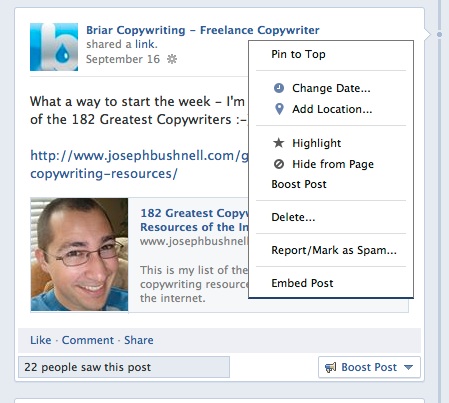
Posts from either your personal or business page can be embedded. All you have to do is click on the drop down arrow (top right of the post you want to embed) and you’ll see the option to embed post:
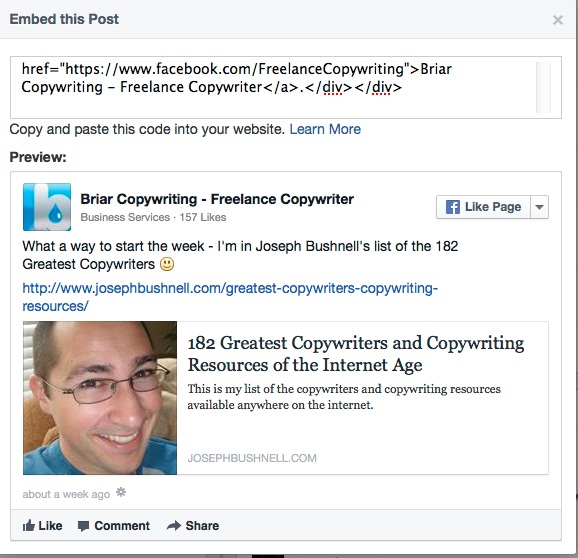
Once clicked, you’ll then get the code required. All you have to do is copy and paste it into your website or blog.
The only caveat is that you can’t embed public posts from within groups. Of course, the privacy settings of the poster will also affect your ability to use the post.
So what benefit will embedded posts bring?
Well, they can be used as:
- Testimonials
- Examples of Facebook usage if you blog about stuff like that
- Interactive material especially if it’s a statistic you want to share (referencing the original source with a link)
- A tool through which to share video
- A way of boosting engagement of a Facebook discussion
Not only that, but all embedded posts include a ‘Like’ button for the page, so you could also increase your fan base.
Over to you
Is this news to you, or are you already using it?
If so, what have been your experiences? Good or bad.
Leave a comment below
Author: Sally Ormond, Copywriter and MD at Briar Copywriting Ltd. Follow her on Twitter and Google+