November 5th, 2010 — copywriter, freelance copywriter, internet marketing, search engine optimisation, seo
As a freelance copywriter about 95% of my marketing activties are carried out online. Therefore I have had to learn the intricacies of search engine optimisation fairly quickly to gain front page rankings to ensure my business (Briar Copywriting) is visible to potential clients.
But it has taken a number of years and a lot of reading and research to really get to grips with the techniques.
What would you say if I told you there was a definitive guide to SEO available right now?
Yes please!
Well, there is. Google has just released its SEO Starter Guide (am updated version of their 2008 publication). Now before you get over excited let me add this disclaimer:
This guide will not give away secrets that will propel your website to the number one spot in the search results. But it will help you tweak your website to help you gain better visibility to the search engines as well as help you understand the mysteries of SEO.
So, if you’d like to get your hands on this valuable document click on the link below to download your free copy.

November 3rd, 2010 — copywriter, internet marketing, marketing, Video marketing

Your website is a reflection of your business.
For many people it will be the first contact they have with you therefore it must portrait your business in a professional, approachable way.
Your website’s design and the copywriting it contains will go a long way to persuading your reader that you are the company for them, but what if you want to get even more personal?
The power of video
You may have noticed while browsing the net that more and more companies are incorporating video on their website.
But do you think they are a good thing and could you use the power of video to enhance your message?
Well let’s take a few minutes to think about what a video could do:
1. Personal touch
A corporate video, especially one showing you, is a powerful way of conveying your (or your company’s) personality to your viewer. Although it is possible to use the written word to convey this too, writing is unable to show your personality in the same was as a video.
By directly speaking to your customer, you will make an instant connection and they will feel as though they already know you when they decide to do business with you.
2. Product/service insight
It is also a means of quickly showing your product/service range to your viewer.
Rather than having to navigate through your website to read about the particular product/service they need, a video can quickly show them what you can offer. Of course, you can also utilise videos as ‘How to’ guides to provide your visitor with a comprehensive library of help topics which will add value to your relationship with them.
3. Innovative
The use of video on your website will also show you as a forward thinking organisation. Utilising the latest technology shows you as a company that thinks beyond the normal limits of marketing.
4. Search engine optimisation
Google loves video so incorporating it within your website will give your search engine optimisation a boost. Whether you host it directly on your website or bring it in from YouTube, utilising the descriptive element of your video will enhance your online visibility.
Sounds great doesn’t it? But there are also a few other things you have to take into consideration…
- Music – not everyone will be thrilled if your website begins to blast out music as soon as it’s open. Make sure there is an obvious icon to click to mute or reduce the decibels.
- Auto play – don’t have your video on autoplay. Have it plainly visible so your reader can decide when (or if) they want to play the video.
- Load speed – video can affect the load time of your website so be careful. When browsing the net people aren’t going to want to hang around while your site loads.
Video can be a very powerful sales tool. It makes an instant connection with the viewer, offers an innovative way to market your products and a valuable tool through which you can offer help and guidance to your customers.
November 1st, 2010 — blog, blogging for business, copywriter, online marketing, search engine optimisation
If you follow this blog regularly you’ll know I’m a huge fan of blogging as a way of boosting your online presence. As a copywriter I’ve been using this method for several years now and it works.
Through the power of blogging you have the potential of driving a huge amount of traffic to your main sales site as part of your search engine optimisation strategy.
In an earlier post I looked at how to give your blogs eternal life, well now I want to expand on that theme by talking about how you can optimise each of your blog posts.
Below are 5 tips to help you get the most out of your blog posts through optimisation.
1. Quality content
There is no getting away from the fact that people only want to read well written, informative blog posts.
You must therefore create posts that are easy to read, interesting and informative. If there is value in your content your readers will share it with others. Not only that, it will also attract those all important back links.
2. Keywords
Because you are writing for an online audience you must take care to work out which keywords your post should be targeting. Once you’ve written your post, read it and think about what terms would your reader use to search for it. The primary keywords tend to be quite obvious, but other terms are not so clear-cut.
There are various tools you can use to identify your keywords such as Google’s keyword tool. But there are also a few other tools you can use that will help you identify terms associate with your primary keyword. One is the Google Tilde search. But there is also another more visual tool you can use.
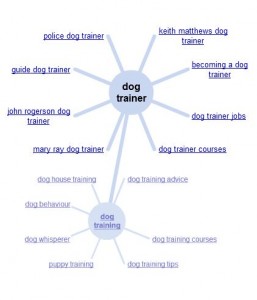
Let me introduce you to the Google Wheel. When you’ve entered your search term into the Google search box, if you look to the left of your screen you’ll see Wonder Wheel.
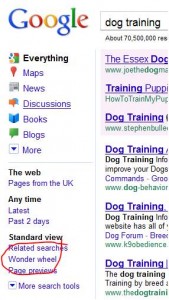
If you click on this it will produce a wheel diagram with your main search term in the centre (in this case ‘dog training’) with associated terms around it:
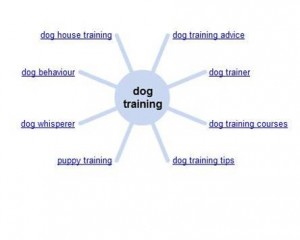
You can then click on any other outer terms to receive further results:
3. META Titles and descriptions
This is one aspect that is often forgotten. The META title and description are there to tell both the reader and search engine spiders what your posts is about. If you use the WordPress.com platform for your blog you can use the All in one SEO Pack to specify these fields.
When writing your titles and descriptions make sure your keywords are near the beginning. There is also a character limit for each (Titles – 72, Description – 165) so you’ll have to carefully plan your words.
4. Links
Both internal and external links are important when writing your posts. As you can see, I’ve used a mixture of both.
Your internal links (utilising related keywords) link out to other posts, while external links take the reader to other related websites. In both cases make sure you use keyword rich links rather than something like ‘click here’ which has no value.
Your external links can also be used to encourage inbound links from other websites as ‘trackbacks’ inform that web owner you have linked to them. Therefore they may in turn link to your posts.
5. URL
The last item on my list is your URL. This I the web address used to link to your post. Make sure you use your keywords within this as it will instantly show the relevance of your post.
Make sure it is meaningful.
By utilising each of these techniques and tools, you will produce meaningful, interesting blog posts that will be found through the search engines. Not only that, but by ensuring you create quality content you will attract links and build your reputation as an expert in your field.
Blogging is an excellent way of getting your voice heard.
October 29th, 2010 — copywriter, freelance copywriter, internet marketing, online marketing, search engine optimisation
 Having a website is the new black – everyone seems to be doing it these days. But there are still a small percentage of businesses that have resisted the urge to dip their toes into cyberspace.
Why are they resisting?
- It wouldn’t suit our customer base
- We get enough customers without having an expensive website
- I don’t understand all that computer stuff
- It’s too expensive
- I don’t want to sell online
- I don’t have time for one of those
These are just a few reasons why businesses shy away from using the power of the internet.
Well, whether you sell online or not, a website is still a very powerful tool for any business. To try to convince you it may be worth taking the plunge, here are 4 reasons why you should consider a website for your business:
1. Open all hours
The last thing you want to do, being a business owner, is to be at your customers beck and call 24 hours a day. We are all struggling to get that work/life balance right, but when you own your own company that can be difficult.
Unlike you, a website doesn’t need to eat, drink or sleep and is open for business 24/7. Your customers can browse it whenever they want to. Plus many people will research local companies on the internet before making a decision about who they’ll buy from. So if you’re not on the net, the changes are you’ll be overlooked.
2. Credibility
As mentioned in my previous point, people like to research companies online before buying.
Your website and its content is a great way to instantly build rapport and credibility with perspective customers. They can take time to read about you and what you offer. If you come across well they will be more inclined to do business with you as they will already feel as though they ‘know’ you.
If you don’t feel confident enough to create your own website copy, hire a professional copywriter to write it for you. That investment will ensure your website contains copy that is powerful, search engine friendly and will convince your customers to get in touch and buy.
3. Money
Appearing online will boost your income potential. Even if you have a physical shop, selling online will generate income for you 24/7. As in my first point, your online shop will never close. If you sell services, your potential customers can react instantly to your website and email you.
With over half of all UK consumers now regularly shopping online (Forrester UK Online Retail and Travel Forecast 2008-2014), if you don’t have a website you’ll be turning your back on a vast untapped marketplace.
4. Widen the net
Having a website will extend your reach.
Rather than relying on local customers, a website will enable to you to reach clients nationally and even internationally. You will tap into marketplaces you’d only ever dreamt of working with before. This could lead to business growth, diversification…the opportunities are endless.
If you think having a website is too expensive, there are alternative services available. I’m thinking of websites such as BT Tradespace and myProspot. Both of these offer the opportunity of utilising their powerful platforms and extensive social marketing tools to market your business.
Plus myProSpot also gives you the opportunity of having your own website, with your own URL (e.g. www.briarcopywriting.com) so it will look just like your own specially developed website but at a fraction of the cost.
So as you can see, there really are no barriers to getting a website.
October 27th, 2010 — copywriter, freelance copywriter, keywords, online marketing, search engine optimisation
Sally Ormond, freelance copywriter, comments on Kieron Hughes’ post “Using YouTube as a keyword research tool for SEO” that appeared on SEOMOZ.org
When you think about keyword research, you probably instantly think about your products, services and geographical information.
The main tool you would probably name would be the Google Adwords Keyword Tool. After all, what better authority on keyword value than Google’s own tool, right?
Well there is also another possibility; one that actually gives you data from the search engine using public – so straight from the horse’s mouth.
I came across it in a post on SEOMOZ.org by Kieron Hughes – in his post he discusses the merits of using YouTube as a keyword research tool for SEO.
As Kieron states uploading videos to YouTube is simple, anyone with a computer and internet connection can do it. But it’s not the video itself that is valuable for research purposes; it’s the descriptive content that accompanies it that is a gold mine of information.
Taking the example of speech therapy, Kieron illustrates how a search on YouTube generated associated words such as:
• Autism
• Oral motor exercise
• Chewy tube
• Down syndrome
• Oral motor therapy
• Apraxia
That would not have been generated through Google’s tool. So if you are researching a subject area for a client in which you don’t have in depth knowledge, YouTube could prove a valuable tool in your keyword research armoury.
A gold mine of information
People from all walks of life, professionalisms and personal experiences use YouTube as a platform to share their knowledge and experiences. These are normally people who use the search engines daily and so are invaluable sources of information.
So by using YouTube as a resource you could change your initial site navigation from:


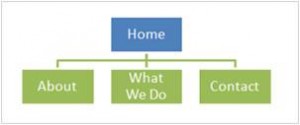
To something more representative of your industry with greater SEO potential:

So next time you are doing some keyword research – either for yourself or for a client – don’t overlook the potential of YouTube.